Upcoming Events and Goals
There is a health science research day on November 15 at the medical school. This will have a lot of students presenting their research. This is done in a room full of students standing next to posters displaying their research and answering questions about their research. There will be a wide variety of research, some of which is fairly straightforward to understand and some of which is overwhelmingly difficult. Fortunately, we are free to choose who we want to interact with. To give you an idea of the range of topics, here is a list of the posters from last year.
I would like you to consider being there from 8 to 11 am when the undergraduates will be presenting their research. You don’t have to be there the whole time. You will need to talk to your parents about getting out of school and getting there and getting picked up. I’ll be there at 8 to meet you and help you make connections, talk to people and understand their research.
In the meantime, I want to help prepare you to be able to interpret their posters so that you can understand the discussion and ask good questions.
Topics we have covered related to this:
- the organization of a research paper (which is also reflected in a poster)
- root words that are used frequently in research
- structural diagrams of organic molecules
- scientific notation
- error bars
- cell membrane receptors
- medical imaging
- antibodies
- genetics
- microscopy pictures
Topics we will need to cover in the next few weeks:
- gel electrophoresis
- polymerase chain reaction (PCR)
- model organisms
- reading graphs and charts
- bar charts
- pie charts
- line graphs
- histograms
- semi-log graphs
- log graphs
- Kaplan-Meier plots
- units
- statistics
- p values
- standard deviation
- bell curves
- confidence intervals
Greek and Latin Roots
Here is the list of Greek and Latin roots for this week:
Here is a link to all of the Greek and Latin roots we have discussed.
Test your memory of the Greek and Latin roots that we have discussed with this quiz.
This is the link to the Wikipedia list of Greek and Latin roots.
Assignments
- Fill out the list of Greek and Latin roots.
- Write in the meaning of each root
- Give at least one example of each, be prepared to give its actual definition and the way that it is related to the root word
- Example: If I gave you the root “onym”, you could give the word “synonym” which has the definition of two words with the same meaning. The two roots in the word “syn” and “onym” mean “same name”, indicating two words that name the same thing.
- Fill out the blank space at the bottom with your own root that you have discovered. This will likely come from some of the example words that you have already written. Give a different example than what you have used.
- Example: syn- means “same”, example word “synchronous”
- Presentation
- Research your topic of choice and be prepared to give a 5-minute presentation on the topic, geared toward people your age level.
- Include the background information needed for someone who does not know the topic as well as you.
- Be prepared to talk about how you found this information.
Next week we will meet on 11/14/24.
Things We Discussed
Greek and Latin roots
The following links have many interesting words related to the roots we covered this week.
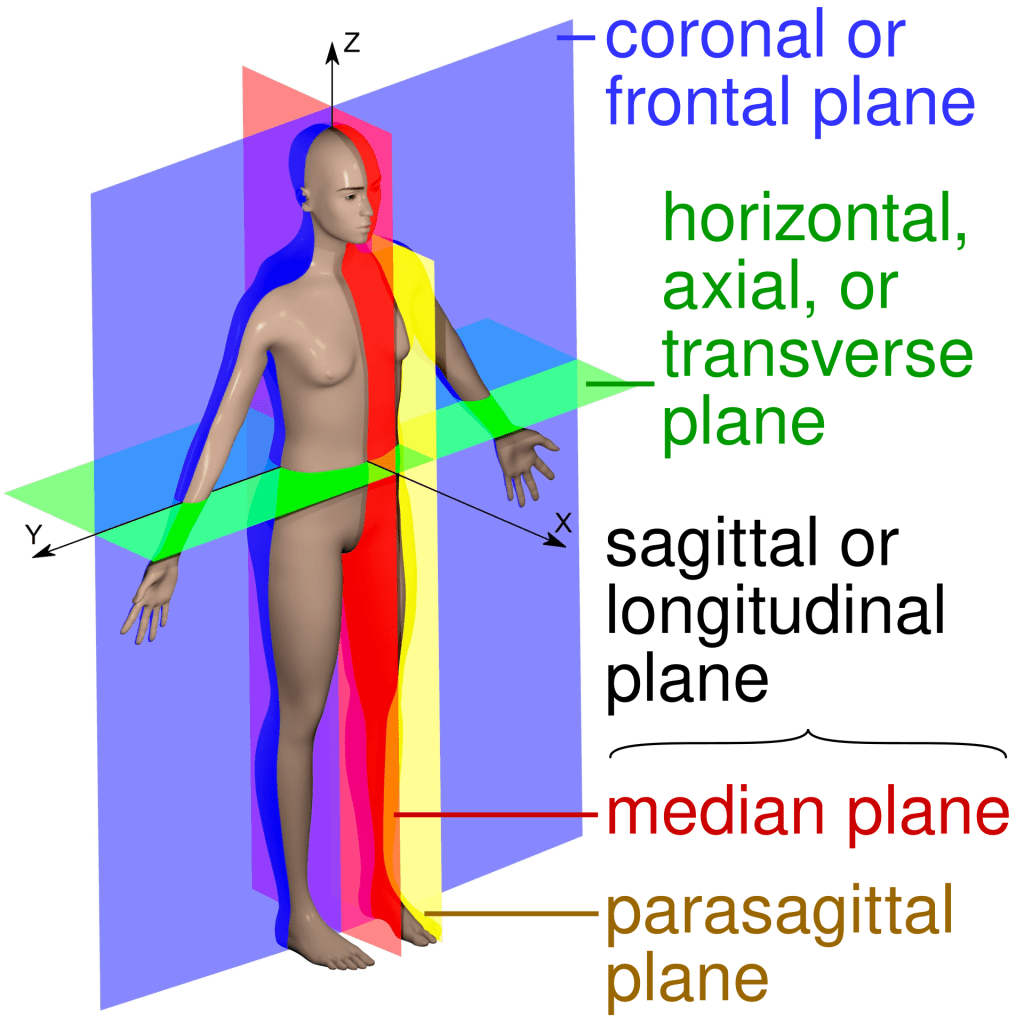
Anatomical planes

Cell death
Three types of cell death we discussed include:
- Apoptosis: A form of programmed cell death that occurs in multicellular organisms. It is a controlled and orderly process that enables the body to remove damaged, unnecessary, or potentially harmful cells without causing an inflammatory response. Apoptosis is essential for development, immune function, and maintaining tissue homeostasis.
- Necrosis: A form of uncontrolled cell death that results from injury, infection, or other external factors leading to cell damage. Unlike apoptosis, necrosis often triggers an inflammatory response because cellular contents are released into the surrounding tissue, causing damage and swelling.
- Cell Senescence: A state in which a cell loses its ability to divide and grow, but does not die. This process is typically triggered by cellular stress or damage and acts as a protective mechanism to prevent the proliferation of damaged cells. Senescent cells accumulate with age and can contribute to aging and age-related diseases. Eventually the cell dies because it cannot repair itself.
Gene transfer in bacteria
There are three main types of gene transfer in bacteria:
- Conjugation: Two bacteria form a tube between them and swap some DNA
- Transformation: Bacteria absorb DNA from the environment around them.
- Transduction: A virus brings DNA into the cell.
Transformation and transduction are used in genetic engineering to get new DNA into bacteria.
Arduino
There is a lot of information about using an Arduino on the internet. Here are some helpful resources:
- Arduino – Home
- Software | Arduino – specifically, this is the place to get the software needed to program the Arduino
- UNO R3 | Arduino Documentation
- Tutorials | Arduino Documentation – A lot more tutorials
- 3 tutorials by Lady Ada | Adafruit Learning System
- 18 tutorials by Simon Monk | Adafruit Learning System
Many YouTube videos, including:
ESP-32 CAM
There are many variations of an Arduino. One I brought is the ESP-32 CAM which has a camera attached as well as WiFi and Bluetooth capabilities.

The ESP32-CAM is cheaper and more capable than the Arduino Uno. However, it is missing components that make it easy to connect to a power supply and to program. This makes it more difficult for a beginner to use.
Programming the Arduino
The Arduino is programmed in a language called C++. There are many examples in the IDE to help you get started.
Here is the code for the simplest program, which blinks the LED that is built into the Arduino itself.
void setup() {
  // initialize digital pin LED_BUILTIN as an output.
  pinMode(LED_BUILTIN, OUTPUT);
}

// the loop function runs over and over again forever
void loop() {
  digitalWrite(LED_BUILTIN, HIGH);   // turn the LED on
  delay(1000);                       // wait a second
  digitalWrite(LED_BUILTIN, LOW);    // turn the LED off
  delay(1000);                       // wait a second
}
All of the words that follow // are comments. These are there for people to read to understand what the code is doing. The comments are ignored by the computer and not part of the program itself.
There are two functions that are defined by this program: setup() and loop(). The setup() function is always run one time each time the Arduino is started up. The Arduino then performs the loop() function repeatedly until power is turned off.
The program uses three functions which are defined somewhere else by someone else. We don’t need to know what the code is that makes these functions work. We just need to know how to use the functions.
The pre-defined functions used by this program are:
- pinMode()
- digitalWrite()
- delay()
pinMode() sets the mode of a pin to either send a signal out (OUTPUT) or receive a signal (INPUT).
digitalWrite() sets the voltage at the pin to either HIGH or LOW. When the pin is set to LOW, the voltage at the pin is 0. When the pin is set to HIGH, the voltage is usually set to 5V.
delay() causes the program to stop doing anything for the number of milliseconds inside the parentheses.
Voltage divider
3D Printing
3D printing involves several steps:
- Design something in a CAD program
- Using a program called a slicer to convert the CAD file into a G-code file
- Printing the G-code file on a 3D printer
Computer-aided Design (CAD)
A good place to get started on CAD is Tinkercad. This is a very easy way to start to learn and to design something to 3D print.

However, most people who 3D print will eventually use more complex and powerful CAD programs, such as Fusion 360 or FreeCAD.
Slicer
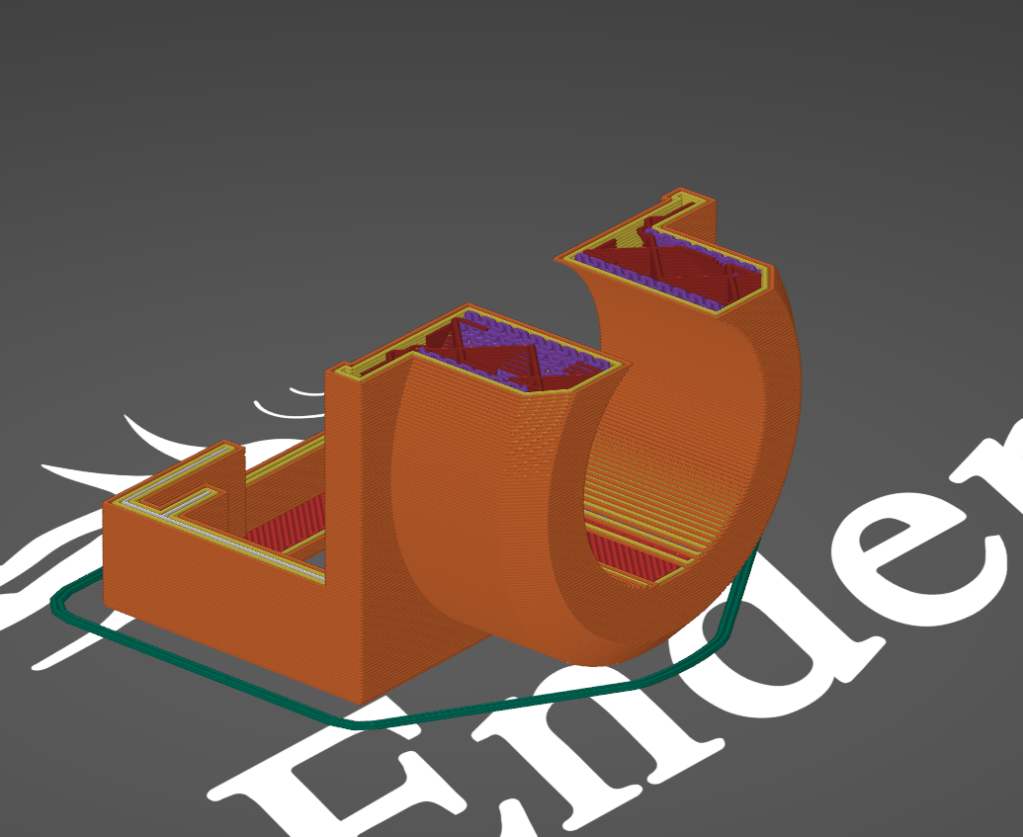
A slicer is a program that covers the 3-dimensional design from a CAD program into a pathway for the 3D printer to follow. It is called a slicer because it thinks of the object as a stack of slices.
 CoMo Science
Leave a comment