This is part of a series of posts on getting started with Arduino. Others in the series include:
- Arduino: Getting Started
- Arduino: Basic Troubleshooting
- Arduino: Understanding the Structure of C
- Arduino: Understanding Blink
- Arduino: Modifying Blink
- Arduino: Functions & Variables
- Arduino: Strings & Serial
This post continues to focus on learning to program the Arduino by modifying “Blink”, greatly expanding its capabilities by adding variables and functions. This is a continuation of the previous post (Arduino: Modifying Blink) and you should read that one first.
We will be converting the Blink program into one that can blink the entire Morse code.
The Goal
Although the scheme laid out in the last post provides a way to produce a program that can blink out any Morse code, there are a couple of problems:
- The program is long and redundant
- It is cumbersome to change the message to be transmitted.
The goal of this post will be to introduce additional functions that will overcome these problems.
The Modified Program So Far
Here is the full code to repeatedly send out the message “SOS”.
int timeUnit = 500;

void setup() {
  pinMode(LED_BUILTIN, OUTPUT);
}

void loop() {
   S();
   O();
   S();
   spaceBetweenWords();
}

void dot() {
  digitalWrite(LED_BUILTIN, HIGH);
  delay(timeUnit);
  digitalWrite(LED_BUILTIN, LOW);
  delay(timeUnit);
}

void dash() {
  digitalWrite(LED_BUILTIN, HIGH);
  delay(3*timeUnit);
  digitalWrite(LED_BUILTIN, LOW);
  delay(timeUnit);
}

void spaceBetweenLetters() {
   delay(2*timeUnit);
}

void spaceBetweenWords() {
   delay(4*timeUnit);
}

void S() {
   dot();
   dot();
   dot();
   spaceBetweenLetters();
}

void O() {
   dash();
   dash();
   dash();
   spaceBetweenLetters();
}
If statements
Sometimes we want a block of code to only be used if certain conditions are met. In this case, we want the Arduino to flash three dots if the next letter is an “S”. We can do this with this code:
if (j == 'S') S();This code can be read as: if the content of the variable j is the character S then run the code in function S().
There are some important points to note about this code.
The difference between = and ==
The program uses two symbols which look very similar to people but are understood very differently by the computer. = means “make a variable equal to something”. == asks “are these two things equal”.
| Symbol | Meaning |
| = | make them equal |
| == | are they equal? |
The difference between “S” and ‘S’
In the code above, the variable j has a variable type of char. “S” has a type of String. In order to specify that we want the character ‘S’ and not the string “S”, we must use single quotation marks.
| Variable type | Symbol |
| String | ” (double quotation mark) |
| char | ‘ (single quotation mark) |
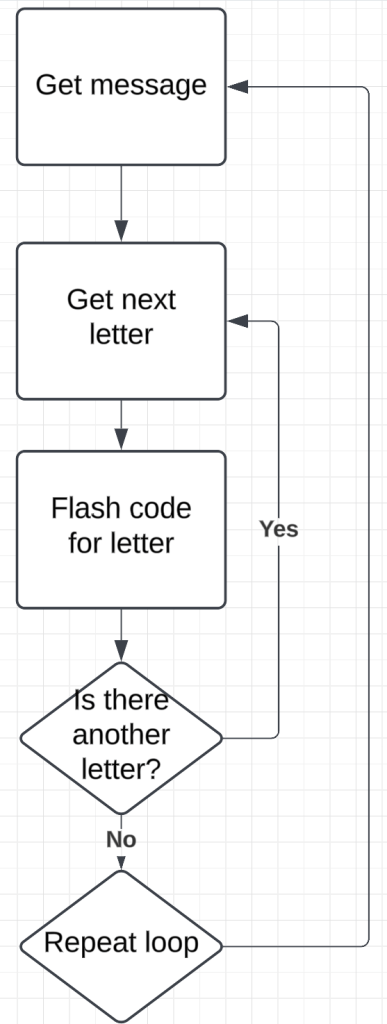
For statements
A For statement can be used to get each character in our string, one by one. The for statement looks like this:
for (int i = 0; i < message.length(); i++) {
    //some code to repeat
}
There are multiple parts to the for statement.
| Part | Meaning |
| int i = 0 | start counting at 0 |
| i < message.length() | keep counting as long as i is less than the length of message |
| i++ | increase i by 1 |
int timeUnit = 500;

String message = "SOS";

void setup() {
  pinMode(LED_BUILTIN, OUTPUT);
}

void loop() {
  for (int i = 0; i < message.length(); i++) {
    char j = message[i];
    if (j == 'O') O();
    if (j == 'S') S();
  /*
  this pattern would need to be extended to include all 26 letters.
  */
    spaceBetweenLetters();
  }
}

void dot() {
  digitalWrite(LED_BUILTIN, HIGH);
  delay(timeUnit);
  digitalWrite(LED_BUILTIN, LOW);
  delay(timeUnit);
}

void dash() {
  digitalWrite(LED_BUILTIN, HIGH);
  delay(3*timeUnit);
  digitalWrite(LED_BUILTIN, LOW);
  delay(timeUnit);
}

void spaceBetweenLetters() {
   delay(2*timeUnit);
}

void spaceBetweenWords() {
   delay(4*timeUnit);
}

void S() {
   dot();
   dot();
   dot();
}

void O() {
   dash();
   dash();
   dash();
}

/*
Functions would need to be added for all 26 letters.
*/ CoMo Science
Leave a comment