
Summary
I built a bluebird house that included a ESP32-CAM and recorded a pair of bluebirds as they built a nest, laid eggs, and raised their babies.
Stages of the project included:
- Programming the ESP32-CAM
- 3D printing a holder for the ESP32-CAM
- Building a modified bluebird house
- Installing the bluebird house
- Monitoring the bluebirds
- Creating a time lapse video
Extensive discussion of the results and planned improvements is included.
Background
Bluebirds are the state bird of Missouri. Many people put up bluebird houses to help the birds and to enjoy seeing them in their yards. A standard design for a bluebird house includes a door on the side designed for maintenance and clean-out, but which can also be used to monitor the nest. However, monitoring the nest too early can discourage nesting. Monitoring too frequently can stress the birds. Opening the door after the 13th day after hatching can result in early fledging which increases the risk to the babies.
I designed a system to allow real-time monitoring of the activity within the birdhouse without disturbing the birds. It also allows recording of images of the birds throughout the nesting period.
Programming the ESP32-CAM
I programmed the ESP32-CAM based off tutorials from http://randomnerdtutorials.com which are listed in the references below.
Features of the program include:
- Recording images and saving them to the SD card
- Transmitting images via WiFi for real-time monitoring of the nest
- Transmitting data about the functioning of the program itself
- Enabling modification of certain parameters, such as timing of the images, via WiFi
- Enabling initialization of parameters via a file stored on the SD card
A copy of the program can be found in the appendix at the end of this page.
3D printing a holder for the ESP32-CAM
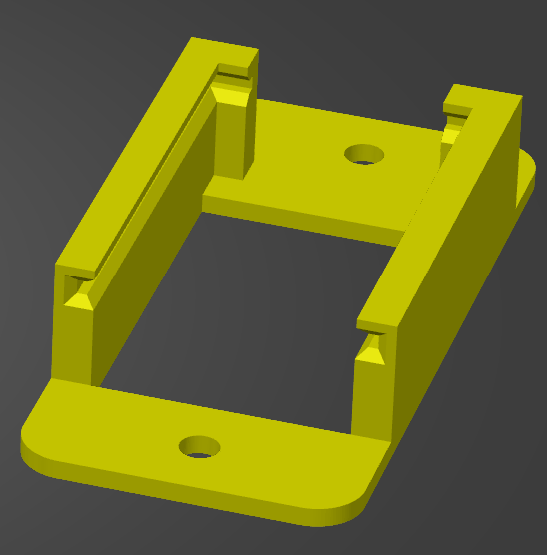
I 3D printed a holder for the ESP32-CAM.
Building a modified bluebird house
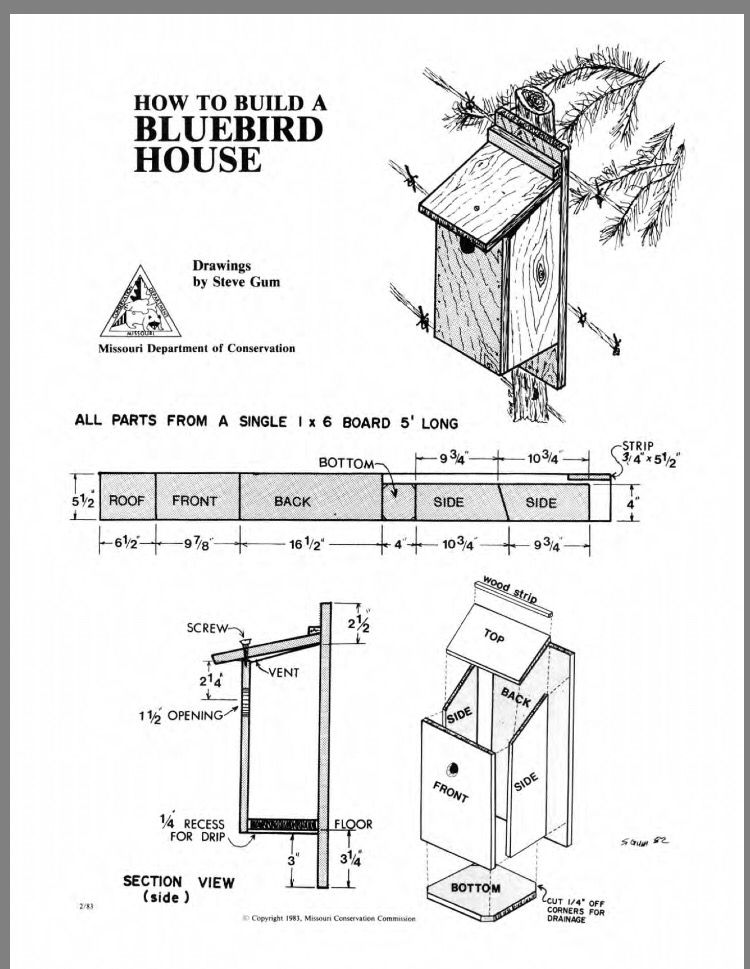
I modified a standard one-board bluebird house by adding an additional 2 inches to the height of the house which allowed room for the camera.


Installing the bluebird house
Frequent recording of images over an extended period of time would quickly run down a battery, so the ESP32-CAM is powered by an extension cord which required placement of the bird house fairly close to the house. Fortunately, this did not keep the birds from using the house.


Monitoring the bluebirds
The ESP32-CAM acts as a WiFi access point, transmitting an image every 2 seconds, allowing monitoring of progress throughout the nesting period.
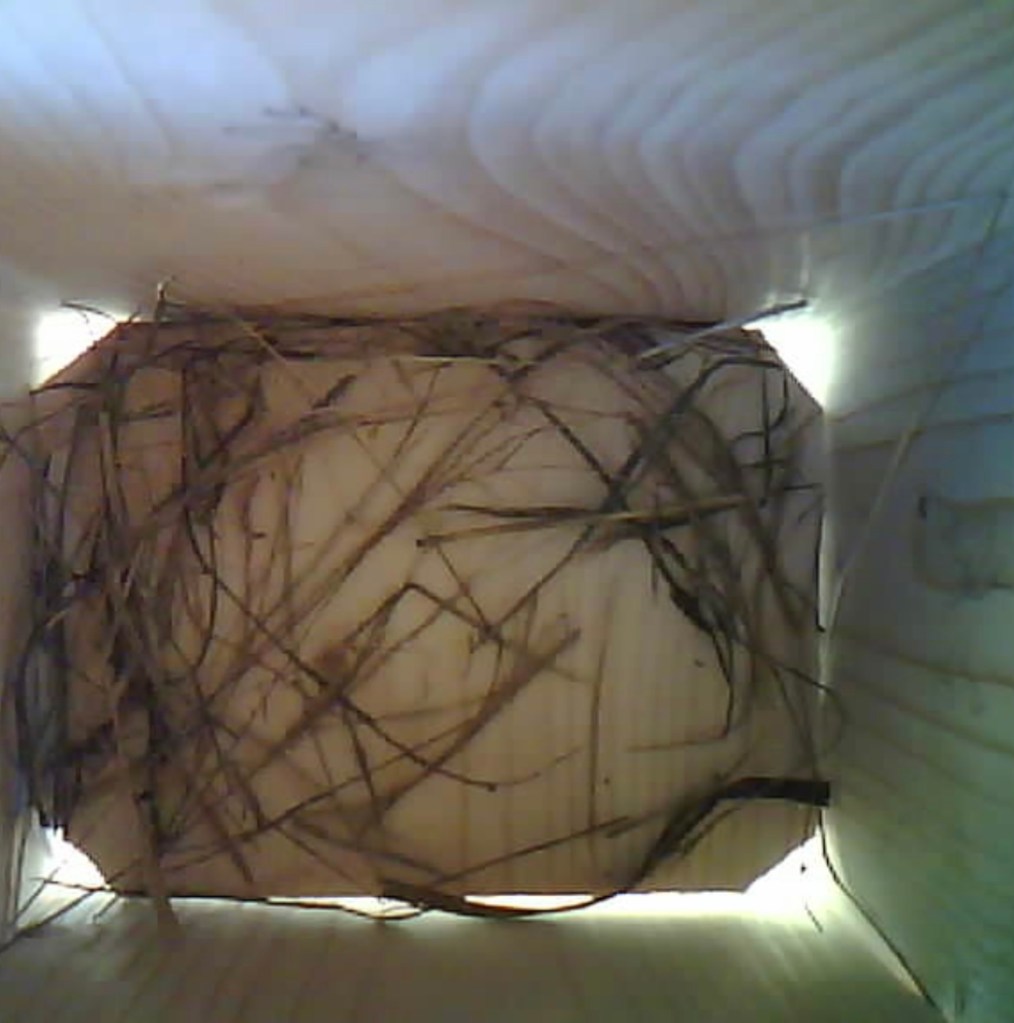

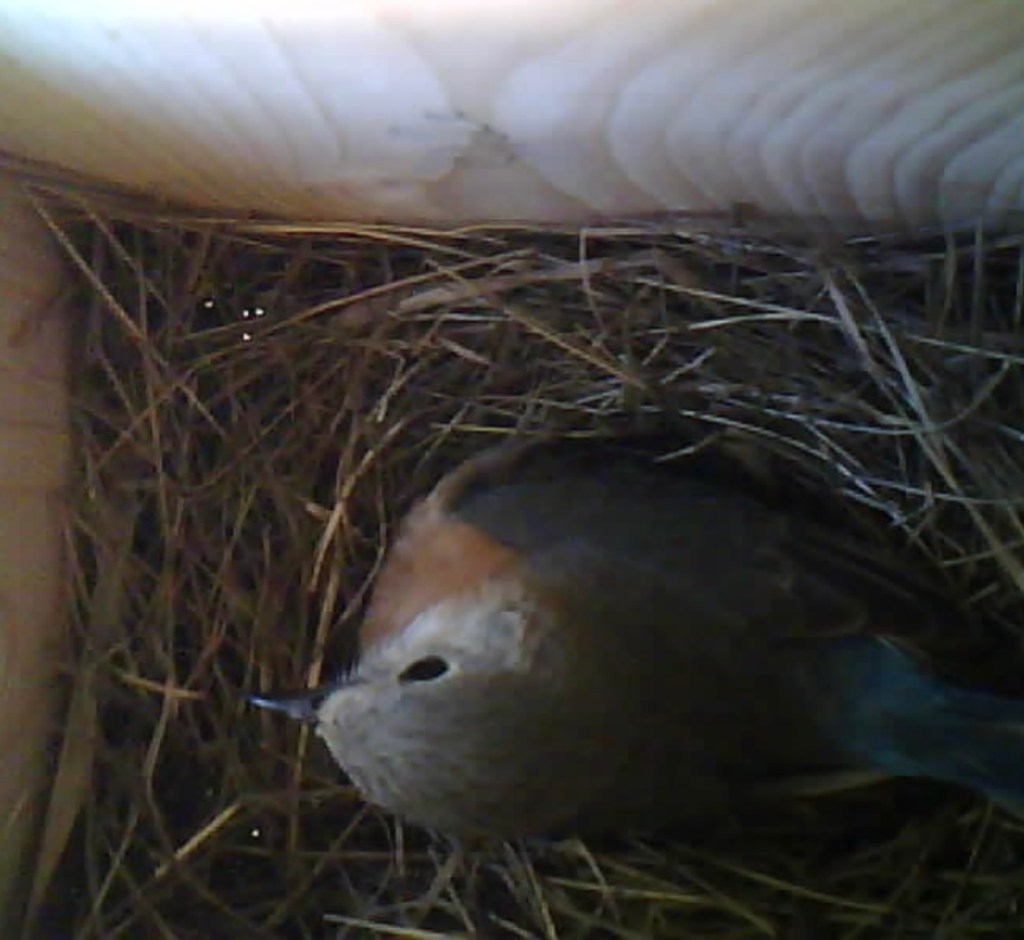
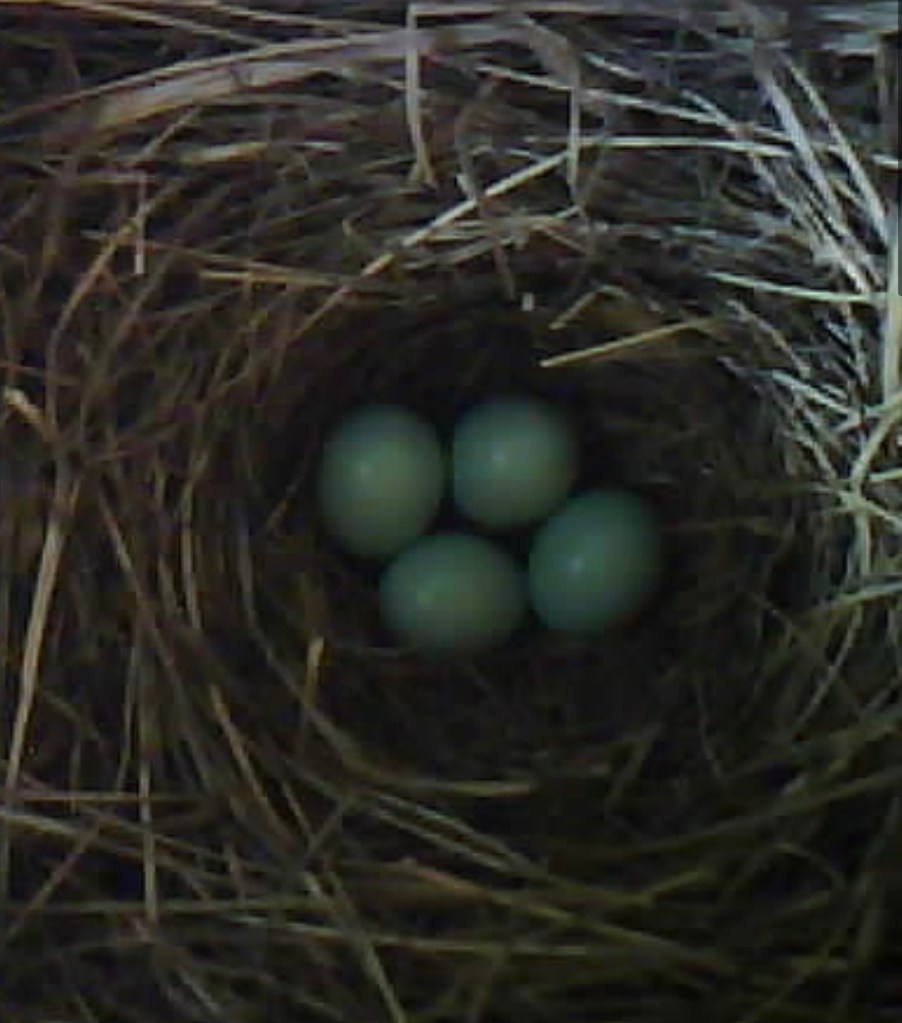
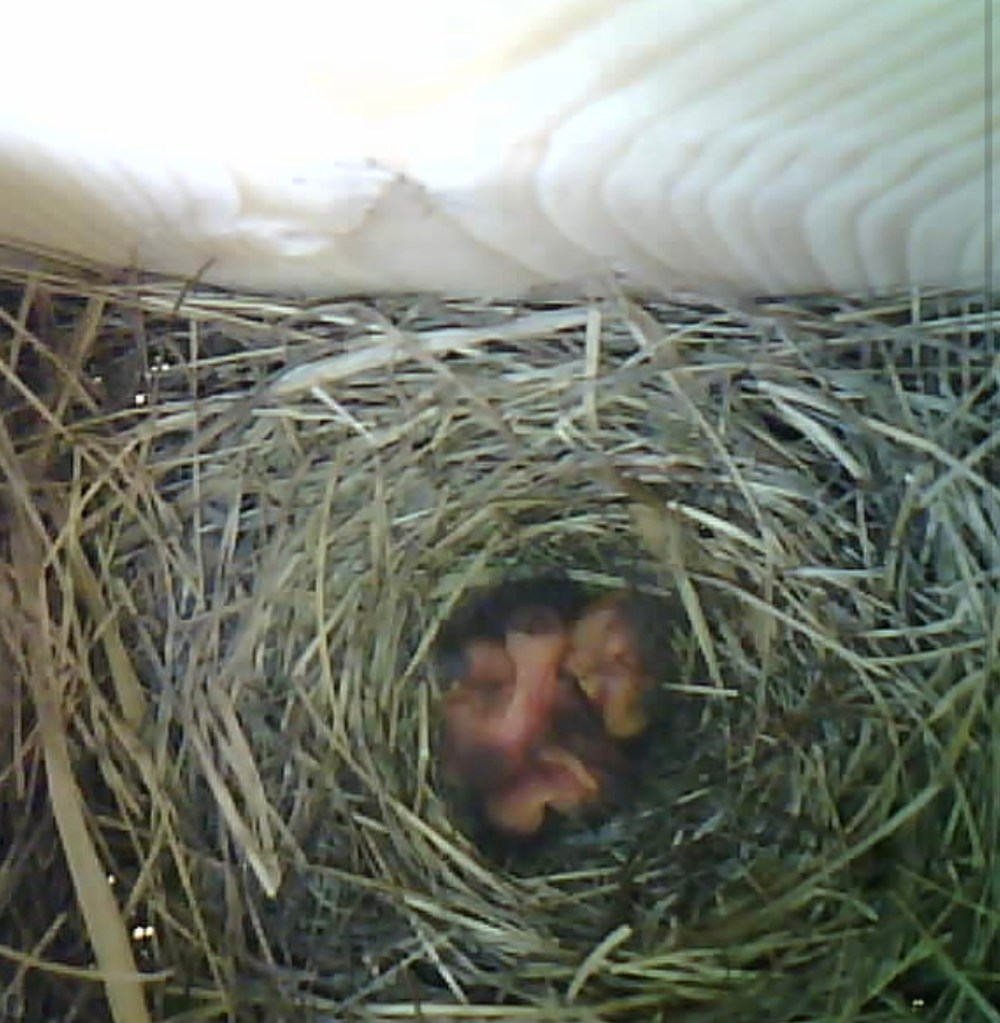
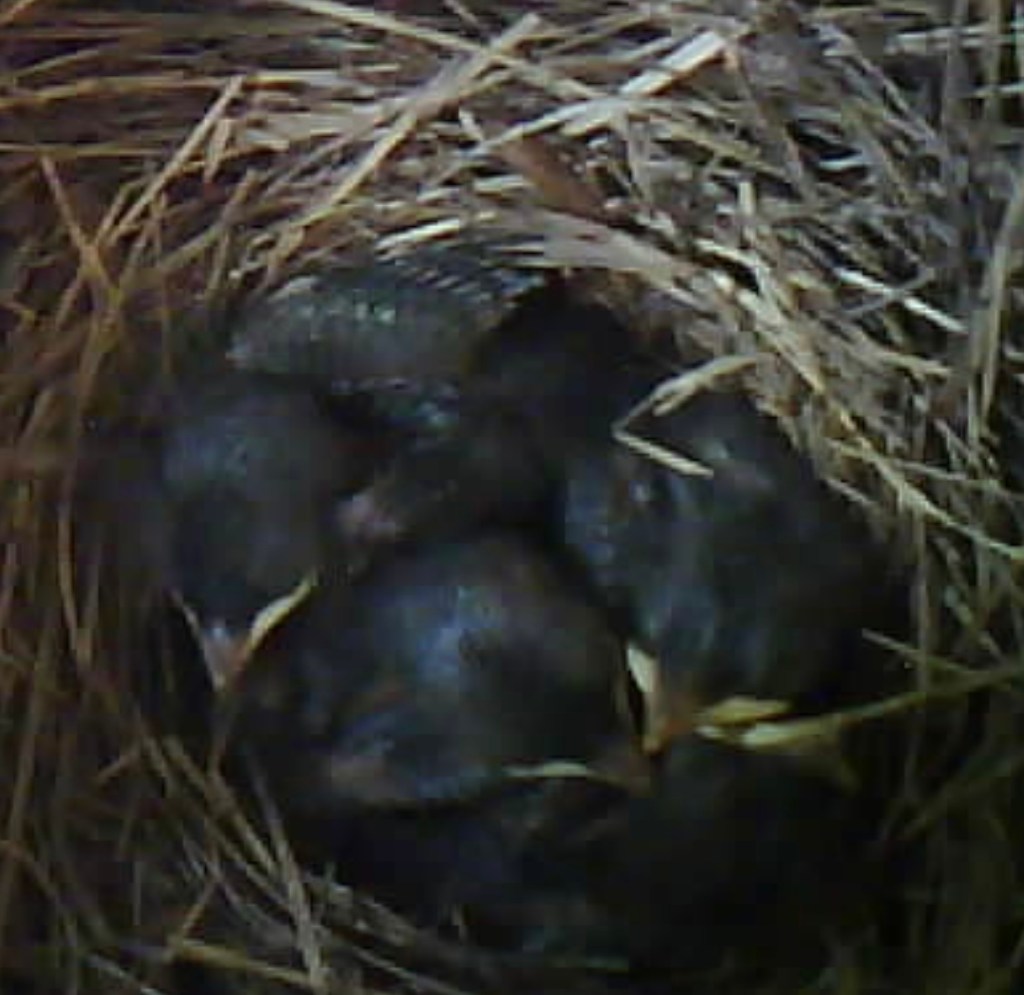
Although my program was not designed to transmit video, I realized I could record my iPhone screen as a video to create a video of the web page updates.




Creating a time lapse video
Images were taken in two different modes. One mode involved recording an image every 15 minutes throughout the nesting period. The other mode involved recording a burst of 500 images as fast as possible, which for the ESP32-CAM seems to be about once every 15 seconds.
These still images were combined in Abode Photoshop to make a time lapse video.
Results of observations of birds
Timing
| Event | Date | Days since previous event |
| Bluebird house installed | 3/13/25 | |
| First sign of nest building | 3/23/25 | 10 days |
| Hatching | 4/22/25 | 30 days |
| Fledging | 5/10/25 | 18 days |
Based on WiFi observations, my best estimate of egg laying is 4/7/25 for the third egg and 4/8/25 for the 4th egg.
Presence of mother bird
The mother sat on the nest much less than I expected.
Movement of grass in the nest suggested that the birds were frequently visiting the nest but did not stay long.
The mother was more present after the fourth egg was laid until the babies began to have feathers. Once the babies had feathers, the mother’s presence dropped off to a level similar to what it was prior to hatching the eggs. Even during the period when the mother was most present, the average was around 70% of the time.
Once the babies had feathers, the parents were frequently visiting as evidenced by the growth of the babies, but the duration of each visit was brief, so it was rarely captured on camera.

Observations of the recording system
Average Photo Intensity
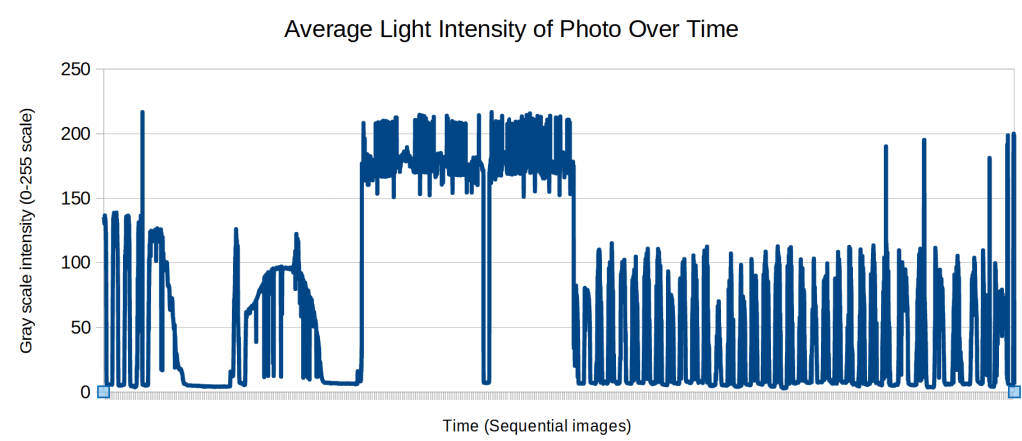
I wrote a Python program to calculate the average grayscale intensity of each photo. This shows the day and night cycle as well as the times when the LED was on continuously. It also shows when the frequency of images was increased.
Lighting
The built-in LED was used periodically to make occasional night time observations. It was also used to record all images for several days at a rate of about once every 15 minutes. This did not seem to bother the birds.
The images were more uniformly lit with the LED, although the color was too yellow.
Having the images lit with natural lighting enabled determination of the date and approximate time of day an image was taken. Using an LED lost this information and consistent use of the LED for several days caused complete loss of date information.
Images
5,291 images were recorded over a period of 58 days (3/13-5/10), averaging one image every 15 minutes. Of these, 6 images were corrupted, all at night on two separate nights. The corrupted images were easily identified as they a size of 0 bytes.
WiFi range
The ESP32-CAM can act as an access point. When it is inside the birdhouse, the WiFi range was about 30 feet. This required being near the birdhouse which did cause some defensive behavior by the adults.
WiFi glitches
The WiFi would occasionally not be working and power had to be cut to reboot the system. It is unclear how long these glitches might be occurring before they were discovered but it is likely to be at least hours. There is no obvious discontinuities in the image set, suggesting the system continued to record images even when the WiFi was not working.
Discussion
Bird Observations
Although this was primarily a demonstration of the capabilities of the ESP32-CAM and a trial of the program I was using, I was able to obtain some interesting results.
Recording frequent images within the birdhouse allowed for accurate dating of the initiation of nest building, and an estimate of the date the last egg was laid. This, in turn, allowed for an accurate estimation of the date of hatching and ultimately the date of fledging, which allowed for closer monitoring of these events.
It also allowed for quantification of the percent of the time that an adult bird was present.
The birds did not seem to be bothered by the LED flashing every 15 minutes.
It would be good to have a second camera set up outside the birdhouse on the day that they fledge.
System Trial
The system settings that seemed to work the best include:
| Image frequency | every 15 minutes |
| LED duration | 200 msec |
| LED duty cycle | 20% |
| Flash | off |
The system has the ability to take a burst of 500 images as quickly as possible. This worked well although there were few times when it seemed helpful.
Problems and Planned Improvements
Inconsistent Lighting
Using natural lighting led to inconsistent lighting and images that were so dark that details were difficult to see. It may be possible to have the LED on at a low level at all times to improve the lighting. Occasional light flashing did not seem to concern the birds. However, frequent flashing may be more disturbing. A constant low level of light may work better.
Yellow Lighting
The LED flash produces a yellow tint to the images. This might be corrected with an external white LED.
Inability to Accurately Date Events
One of the major limitations I experienced was not being able to accurately date events, such as the timing of egg laying. Passage of time can be easily determined by the cycle of light when natural lighting is used. However, during testing of the LED, this information was lost.
There are several methods that can be used to accurately date events in future projects. These include:
- Keeping the frequency of image recording constant
- Using natural lighting consistently
- Using a real-time clock
- Logging changes to the settings to keep track of the frequency of image recording
Many Dark Images
Many of the images were taken in the dark. It is unclear if any interesting activity occurred after dark. Perhaps the mother was more frequently present at night when the temperatures are lower and she is not spending time feeding.
The ESP32-CAM is able to use a 32MB SD card. Despite the system taking over 7,000 images, there was plenty of memory. Recording dark images did not cause any memory concerns.
However, nearly half of the images were too dark to be useful. These images used significant computer time and manpower as the images were converted into a video.
The ESP32-CAM does not have the processing power to analyze the images and determine if they are worth saving. However, an external photodiode could be used to determine if there is enough light to take a picture.
A list of images that are too dark to use can be generated with a Python program and then excluded from the video without manual labor.
Filenames Were Not Sequential When Alphabetized
Without a real time clock, the date and time that a file is recorded is not accurate and is useless if the system has to be rebooted, which happens from time to time. Filenames were numbered in a way that led to them not being sequential when alphabetized. This led to a significant amount of work to fix this later.
This can be addressed in future projects by padding the numbers in the filenames with zeroes.
WiFi Glitches
The WiFi occasionally does not work. At other times, the WiFi shows that it is available, but it will not respond to page update requests. It is unclear why these happen or whether the glitches affect the ability to record images.
I also do not know how frequently these glitches occur, although my impression is they occur every few days.
Loss of Setting Changes
Rebooting the system results in loss of any changes to the system. For instance, if the system is initially set up to record once an hour (reasonable before nest building begins), but then set to every 15 minutes after activity in the birdhouse is noted, it will revert back to record once an hour after a system reboot. It may be several hours before this is noticed and corrected.
This can be addressed by saving the changes to the SD card so that the system can be initialized with the new settings after rebooting.
Summary of Planned Improvements and Observations
- set up camera outside of birdhouse on the expected fledging day
- use consistent frequency and lighting
- log errors, resets, WiFi accessed and setting changes
- pad numbers in filenames with zeroes
- take note of when glitches occur
- take note of what time of day provides the best natural lighting
- take a burst of images on hatching day
- determine how quickly new nest building starts
- save new settings to the SD card for initialization after rebooting
References
Birding
Where to Place a Bluebird House [The Best Location] – Bluebird Landlord
Nest Box Monitoring Protocol — Virginia Bluebird Society
Coding
ESP32-CAM: Set Access Point (AP) using Arduino IDE | Random Nerd Tutorials
ESP32-CAM Take Photo and Save to MicroSD Card | Random Nerd Tutorials
ESP32-CAM Take Photo and Display in Web Server | Random Nerd Tutorials
Appendix
Code
/* Program Name:  Time Lapse Version 5.2
 *
 * Description:
 * Initializes variables by reading "instructions.txt" from SD card
 * Records image to SD card
 * Sets up access point & streams image as well as data
 *    Data includes:
 *      frequency of images recorded
 *      current picture number
 *      number of pictures recorded
 *      file name
 *      comment from instructions.txt
 *      elapsed time since reboot
 *      elapsed time since last photo
 *      free disk space
 *      error message
 *
 * Version 5:  Put inputs at top
 *             More inputs
 *             Read instructions in any order
 *             Save new instructions
 *             limitValues() to limit possible input errors
 *             burst pictures for about 20 seconds
 *                    button on website to start burst
 *                    stops website asking for updates
 *                    takes 500 pictures as fast as possible
 *                    uses different routine with fewer checks to speed picture taking
 *                    program checks every 1 second to see if ready to burst
 *
 * Example "instructions.txt" file:
comment:  Record inside bluebird house
frequency: 900
filename: bluebird
flash:  off
led duration:  100
duty cycle:  20
ssid:
password: (must be at least 8 characters)

This is the instruction file (config file) for Time_Lapse_V5_2
This file must be named instructions.txt
The keys can be in any order.


 */

#include "esp_http_server.h"
#include "esp_camera.h"
#include "WiFi.h"
#include "FS.h"
#include "soc/soc.h"           // Disable brownout problems
#include "soc/rtc_cntl_reg.h"  // Disable brownout problems
#include "SD_MMC.h"
#include <EEPROM.h>
#include <stdio.h>
#include <stdlib.h>

#define EEPROM_SIZE 2
#define CAMERA_MODEL_AI_THINKER  // Define for AI Thinker ESP32-CAM model

String ssid = "ESP32-CAM";
String password = //put your password here
unsigned long startTime;
unsigned long pictureTime;
unsigned long elapsedTime;

//PWM
const int pwmChannel = 12;  // Use channel 12 (chosen at random), channel 0 used for camera clock
const int pwmFreq = 5000;  // 5 kHz frequency
const int pwmResolution = 8;  // 8-bit resolution (0-255)
const int ledPin = 4;  // GPIO4 for output
int ledDuration = 100;
int dutyCycle = 20;

//burst
String burstEnabled = "on";
String burstNow = "off";


int pictureNumber = 0;  //number appended to filename, taken from EEPROM
int pictureCount = 0;  //number taken since reboot
int freq = 30;  //1 = 1 sec
String filename = "default";
String message = "";
String comment = "";
String flash = "on";
int testFlash = false;

String IPaddress = "";

// Camera pin definitions (for AI Thinker model)
#define PWDN_GPIO_NUM     32
#define RESET_GPIO_NUM    -1
#define XCLK_GPIO_NUM      0
#define SIOD_GPIO_NUM     26
#define SIOC_GPIO_NUM     27
#define Y9_GPIO_NUM       35
#define Y8_GPIO_NUM       34
#define Y7_GPIO_NUM       39
#define Y6_GPIO_NUM       36
#define Y5_GPIO_NUM       21
#define Y4_GPIO_NUM       19
#define Y3_GPIO_NUM       18
#define Y2_GPIO_NUM        5
#define VSYNC_GPIO_NUM    25
#define HREF_GPIO_NUM     23
#define PCLK_GPIO_NUM     22

// ============================
// 🚀 Initialize Camera
// ============================
void init_camera() {
    camera_config_t config;
    config.ledc_channel = LEDC_CHANNEL_0;
    config.ledc_timer = LEDC_TIMER_0;
    config.pin_d0 = Y2_GPIO_NUM;
    config.pin_d1 = Y3_GPIO_NUM;
    config.pin_d2 = Y4_GPIO_NUM;
    config.pin_d3 = Y5_GPIO_NUM;
    config.pin_d4 = Y6_GPIO_NUM;
    config.pin_d5 = Y7_GPIO_NUM;
    config.pin_d6 = Y8_GPIO_NUM;
    config.pin_d7 = Y9_GPIO_NUM;
    config.pin_xclk = XCLK_GPIO_NUM;
    config.pin_pclk = PCLK_GPIO_NUM;
    config.pin_vsync = VSYNC_GPIO_NUM;
    config.pin_href = HREF_GPIO_NUM;
    config.pin_sscb_sda = SIOD_GPIO_NUM;
    config.pin_sscb_scl = SIOC_GPIO_NUM;
    config.pin_pwdn = PWDN_GPIO_NUM;
    config.pin_reset = RESET_GPIO_NUM;
    config.xclk_freq_hz = 20000000;
    config.pixel_format = PIXFORMAT_JPEG;

    if (psramFound()) {
        Serial.println("PSRAM found");
        config.frame_size = FRAMESIZE_SVGA;
        config.jpeg_quality = 10;
        config.fb_count = 2;
    } else {
        Serial.println("PSRAM not found");
        config.frame_size = FRAMESIZE_SVGA;
        config.jpeg_quality = 12;
        config.fb_count = 1;
    }

    if (esp_camera_init(&config) != ESP_OK) {
        Serial.println("Camera init failed!");
        ESP.restart();
    }
}

// ============================
// 📸 Capture Image Handler
// ============================
esp_err_t capture_handler(httpd_req_t *req) {
    //Version 4:
    //Serial.println("changed duty Cycle");
    if (flash == "on" && testFlash) {
//      pinMode(4,OUTPUT);
//      digitalWrite(4,HIGH);
      ledcWrite(pwmChannel, dutyCycle); // Change duty cycle

      delay(ledDuration);
      testFlash = false;
    }
    camera_fb_t *fb = esp_camera_fb_get();

    //Version 4:
    ledcWrite(pwmChannel, 0);


    if (!fb) {
        Serial.println("Camera capture failed");
        message = "Camera capture failed";
        return ESP_FAIL;
    }

    // Set the response type to image/jpeg
    httpd_resp_set_type(req, "image/jpeg");

    // Send the captured image data
    httpd_resp_send(req, (const char *)fb->buf, fb->len);

    // Return the framebuffer
    esp_camera_fb_return(fb);
    digitalWrite(4,LOW);
    return ESP_OK;
}

// ============================
// 📊 Sensor Data Handler
// ============================
esp_err_t sensor_handler(httpd_req_t *req) {
    elapsedTime = millis() - startTime; // Calculate elapsed time
    unsigned long seconds = (elapsedTime / 1000) % 60;
    unsigned long minutes = (elapsedTime / (1000 * 60)) % 60;
    unsigned long hours = (elapsedTime / (1000 * 60 * 60)) % 24;
    String elapsedTimeString = String(hours) + ":" +
                    (minutes < 10 ? "0" : "") + String(minutes) + ":" +
                    (seconds < 10 ? "0" : "") + String(seconds);

    elapsedTime = millis() - pictureTime; // Calculate elapsed time
    seconds = (elapsedTime / 1000) % 60;
    minutes = (elapsedTime / (1000 * 60)) % 60;
    hours = (elapsedTime / (1000 * 60 * 60)) % 24;
    String elapsedTimeString2 = String(hours) + ":" +
                    (minutes < 10 ? "0" : "") + String(minutes) + ":" +
                    (seconds < 10 ? "0" : "") + String(seconds);

    uint64_t freeBytes = SD_MMC.totalBytes() - SD_MMC.usedBytes();
    float freeMB = (float)freeBytes / (1024 * 1024);  // Convert to MB
    char buffer[21];
    sprintf(buffer, "%.2f", freeMB);
    String freeSpaceStr = String(buffer);

    String json = "{ \"freq\": " + String(freq) +
              ", \"number\": " + String(pictureNumber) +
              ", \"pictureCount\": " + String(pictureCount) +
              ", \"filename\": \"" + filename + "\"" +
              ", \"flash\": \"" + flash + "\"" +
              ", \"ledDuration\": \"" + ledDuration + "\"" +
              ", \"dutyCycle\": \"" + dutyCycle + "\"" +
              ", \"comment\": \"" + comment + "\"" +
              ", \"elapsedTime\": \"" + elapsedTimeString + "\"" +
              ", \"elapsedTime2\": \"" + elapsedTimeString2 + "\"" +
              ", \"freeBytes\": \"" + freeSpaceStr + "\"" +
              ", \"message\": \"" + message + "\"}";
    httpd_resp_send(req, json.c_str(), HTTPD_RESP_USE_STRLEN);
    return ESP_OK;
}

// ============================
// 🌐 Serve HTML Page
// ============================
const char *html_content = R"rawliteral(
<!DOCTYPE html>
<html lang="en">
<head>
<meta charset="UTF-8">
<meta name="viewport" content="width=device-width, initial-scale=1.0">
<title>ESP32-CAM Streaming</title>
<style>
body { font-family: Arial, sans-serif; text-align: center; }
#stream { max-width: 100%; height: auto; margin-top: 20px; }
#sensor-data { font-size: 20px; margin-top: 20px; font-weight: bold; }
</style>
</head>
<body>
  <img id="esp32Image" alt="Live Stream"><br><br>
  Enter new frequency:<br>
  <input id="inputFreq"></input><br><br>
  <input id="flashcheckbox" type="checkbox">Flash On</input><br><br>
  Enter new LED duration:<br>
  <input id="ledPWM"></input><br><br>
  Enter new LED duty cycle: <br>
  <input id="ledBrightness"></input><br><br>
  <button id="btn" onclick="sendFrequency()">Submit</button>
  <br><br>
  <button id="burstNow" onclick = "burstNow()">Burst Now</button>
  <br>
  <p id="data1">Frequency: -- seconds</p>
  <p id="data3">File Name: </p>
  <p id="flash">Flash: </p>
  <p id="ledDuration">LED Duration: </p>
  <p id="dutyCycle">Duty Cycle: </p>
  <p id="data2">Picture Number: </p>
  <p id="pictureCount">Number of Pictures Saved Since Last Reboot:</p>
  <p id="refresh">Refresh: </p>
  <p id="elapsedTime">Elapsed Time Since Last Reboot: </p>
  <p id="elapsedTime2">Elapsed Time Since Last Photo: </p>
  <p id="comment">Comment: </p>
  <p id="freeBytes">Memory Free: </p>
  <p id="data4">Error Message: </p>
  <p id="program">Version: <br><b>Time Lapse V5.2.1</b></p>
  <br>


<script>
refreshCount = 0;
let fetch1 = "";
let fetch2 = "";

function fetchSensorData() {
    refreshCount++;
    fetch(window.location.origin+"/sensor")
        .then(response => response.json())
        .then(data => {
          document.getElementById("data1").innerHTML = "Frequency: <br><b>" + data.freq + " seconds</b>";
          document.getElementById("data2").innerHTML = "Picture Number: <br><b>" + data.number+"</b>";
          document.getElementById("data3").innerHTML = "File Name: <br><b>" + data.filename+"</b>";
          document.getElementById("flash").innerHTML = "Flash: <br><b>" + data.flash+"</b>";
          document.getElementById("ledDuration").innerHTML = "LED Duration: <br><b>" + data.ledDuration+" msec </b>";
          document.getElementById("dutyCycle").innerHTML = "LED Duty Cycle: <br><b>" + data.dutyCycle + "</b>";
          document.getElementById("pictureCount").innerHTML = "Number of Pictures Saved Since Last Reboot: <br><b>" + data.pictureCount+"</b>";
          document.getElementById("refresh").innerHTML = "Refresh: <br><b>" + refreshCount+"</b>";
          document.getElementById("elapsedTime").innerHTML = "Elapsed Time Since Reboot: <br><b>" + data.elapsedTime+"</b>";
          document.getElementById("elapsedTime2").innerHTML = "Elapsed Time Since Last Photo: <br><b>" + data.elapsedTime2+"</b>";
          document.getElementById("comment").innerHTML = "Comment: <br><b>" + data.comment+"</b>";
          document.getElementById("freeBytes").innerHTML = "Memory Free: <br><b>" + data.freeBytes + " MB</b>";
          document.getElementById("data4").innerHTML = "Error Message: <br><b>" + data.message+"</b>";
        })
        .catch(error => console.error("Sensor fetch error:", error));
}
function fetchImage() {
    const url = window.location.origin+"/capture";
    fetch(url)
        .then(response => {
            if (response.ok) {
                return response.blob();  // Convert to blob (binary data)
            } else {
                throw new Error("Failed to fetch the image");
            }
        })
        .then(blob => {
            const imageUrl = URL.createObjectURL(blob);
            document.getElementById("esp32Image").src = imageUrl;
        })
        .catch(error => {
            console.error("Error fetching image:", error);
        });
}

function sendFrequency() {
   f = document.getElementById("inputFreq").value;
   g = document.getElementById("ledPWM").value;
   h = document.getElementById("ledBrightness").value;
   i = "off";
   if (document.getElementById("flashcheckbox").checked) {
    i = "on";
   }
   var xhr = new XMLHttpRequest();
   xhr.open("GET", "/action?freq=" + f+"&led="+g+"&bright="+h+"&flash="+i+"&burst=off", true);
   xhr.send();
}

function burstNow() {
  var xhr = new XMLHttpRequest();
  xhr.open("GET", "/action?freq=&led=&bright=&flash=&burst=on", true);
  xhr.send();
  clearInterval(fetch1);
  clearInterval(fetch2);
  setTimeout(setIntervals,20000);
}

function setIntervals() {
  fetch1 = setInterval(fetchSensorData, 2000);
  fetch2 = setInterval(fetchImage, 2000);
}

setIntervals();

</script>
</body>
</html>
)rawliteral";

// ============================
// 📄 HTML Page Handler
// ============================
esp_err_t index_handler(httpd_req_t *req) {
    httpd_resp_send(req, html_content, HTTPD_RESP_USE_STRLEN);
    Serial.println("in page handler");
    return ESP_OK;
}


// ============================
// 📄 HTML Command Handler
// ============================
static esp_err_t cmd_handler(httpd_req_t *req){
  char*  buf;
  size_t buf_len;
  char variable[32] = {0,};
  char ledVariable[32] = {0,};
  char ledBright[32] = {0,};
  char flashVariable[32] = {0,};
  char burstVariable[32] = {0,};

  buf_len = httpd_req_get_url_query_len(req) + 1;
  if (buf_len > 1) {
    buf = (char*)malloc(buf_len);
    if(!buf){
      Serial.println("failure 1");
      httpd_resp_send_500(req);

      return ESP_FAIL;
    }
    if (httpd_req_get_url_query_str(req, buf, buf_len) == ESP_OK) {
      if (httpd_query_key_value(buf, "freq", variable, sizeof(variable)) == ESP_OK) {
      } else {
        free(buf);
        Serial.println("failure 2");
        httpd_resp_send_404(req);
        return ESP_FAIL;
      }

      if (httpd_query_key_value(buf, "led", ledVariable, sizeof(ledVariable)) == ESP_OK) {
      } else {
        free(buf);
        Serial.println("failure 6");
        httpd_resp_send_404(req);
        return ESP_FAIL;
      }

      if (httpd_query_key_value(buf, "bright", ledBright, sizeof(ledBright)) == ESP_OK) {
      } else {
        free(buf);
        Serial.println("failure 7");
        httpd_resp_send_404(req);
        return ESP_FAIL;
      }
      if (httpd_query_key_value(buf, "flash", flashVariable, sizeof(flashVariable)) == ESP_OK) {
      } else {
        free(buf);
        Serial.println("failure 8");
        httpd_resp_send_404(req);
        return ESP_FAIL;
      }
      if (httpd_query_key_value(buf, "burst", burstVariable, sizeof(burstVariable)) == ESP_OK) {
      } else {
        free(buf);
        Serial.println("failure 9");
        httpd_resp_send_404(req);
        return ESP_FAIL;
      }
    } else {
      free(buf);
      Serial.println("failure 4");
      httpd_resp_send_404(req);
      return ESP_FAIL;
    }
    free(buf);
  } else {
    Serial.println("failure 3");
    httpd_resp_send_404(req);
    return ESP_FAIL;
  }
  Serial.print("variable = ");
  Serial.println(variable);
  Serial.print("ledVariable = ");
  Serial.println(ledVariable);
  Serial.print("flash = ");
  Serial.println(flashVariable);
  if (atoi(variable) > 0) {
    freq = atoi(variable);
  }
  if (atoi(ledVariable) > 0) {
    ledDuration = atoi(ledVariable);
    testFlash = true;
  }
  if (atoi(ledBright) > 0) {
    dutyCycle = atoi(ledBright);
    testFlash = true;
  }
  flash = "off";
  Serial.print("flashVariable = ");
  Serial.println(flashVariable);
  if (strcmp(flashVariable,"on") == 0) {  //changed
    flash = "on";
  }
  burstNow = "off";
  Serial.print("burstVariable = ");
  Serial.print(burstVariable);
  Serial.println("END");
  if (strcmp(burstVariable,"on") == 0) {  //changed
    Serial.println("in burstVariable");
    burstNow = "on";
  }
  limitInputs();
}

void limitInputs() {
  if (freq < 0) {
    freq = 0;
  }
  if (freq > 32000) {
    freq = 32000;
  }
  if (flash != "on") {
    flash = "off";
  }
  if (ledDuration < 0) {
    ledDuration = 0;
  }
  if (ledDuration > 32000) {
    ledDuration = 32000;
  }
  if (dutyCycle < 0) {
    dutyCycle = 0;
  }
  if (dutyCycle > 100) {
    dutyCycle = 100;
  }
}

// ============================
// 🌍 Start HTTP Server
// ============================
esp_err_t start_http_server() {
    httpd_config_t config = HTTPD_DEFAULT_CONFIG();
    httpd_handle_t server = NULL;

    if (httpd_start(&server, &config) == ESP_OK) {
        httpd_uri_t capture_uri = { .uri = "/capture", .method = HTTP_GET, .handler = capture_handler, .user_ctx = NULL };
        httpd_register_uri_handler(server, &capture_uri);

        httpd_uri_t sensor_uri = { .uri = "/sensor", .method = HTTP_GET, .handler = sensor_handler, .user_ctx = NULL };
        httpd_register_uri_handler(server, &sensor_uri);

        httpd_uri_t index_uri = { .uri = "/", .method = HTTP_GET, .handler = index_handler, .user_ctx = NULL };
        httpd_register_uri_handler(server, &index_uri);

        httpd_uri_t action_uri = {
            .uri      = "/action",
            .method   = HTTP_GET,
            .handler  = cmd_handler,
            .user_ctx = NULL
        };
        httpd_register_uri_handler(server, &action_uri);

        return ESP_OK;
    }
    return ESP_FAIL;
}

void init_SD() {
      //Serial.println("Starting SD Card");
  if(!SD_MMC.begin("/sdcard",true)){  //"true" sets 1-bit mode
    Serial.println("SD Card Mount Failed");
    message = "SD Card Mount Failed";
    return;
  }

  uint8_t cardType = SD_MMC.cardType();
  if(cardType == CARD_NONE){
    Serial.println("No SD Card attached");
    message = "No SD Card attached";
    return;
  }
}

void readInput() {
  //Read input file
  File inputFile = SD_MMC.open("/instructions.txt",FILE_READ);
    if (!inputFile) {
      Serial.println("Failed to open instructions.txt");
      message = "Failed to open instructions.txt";
    }
    else {
      int linecount = 0;
      while (inputFile.available()) {
        String line = inputFile.readStringUntil('\n');
        Serial.println(line);
        int colonIndex = line.indexOf(':');
        if (colonIndex != -1) {
          String key = line.substring(0,colonIndex);
          String value = line.substring(colonIndex + 1);
          key.trim();
          value.trim();
          Serial.println(value);
          linecount++;
          if (key == "comment") {
              comment = value;
              Serial.print("comment = ");
              Serial.println(comment);
          }
          if (key == "frequency") {
              freq = value.toInt();
              Serial.print("frequency = ");
              Serial.println(freq);
          }
          if (key == "filename") {
              filename = value;
              Serial.print("filename = ");
              Serial.println(filename);
          }
          if (key == "password") {
              password = value;
              break;
          }
          if (key == "flash") {
              flash = value;
              Serial.print("flash = ");
              Serial.println(flash);
          }
          if (key == "led duration") {
              ledDuration = value.toInt();
              Serial.print("led duration = ");
              Serial.println(ledDuration);
          }
          if (key == "duty cycle") {
              dutyCycle = value.toInt();
              Serial.print("duty cycle = ");
              Serial.println(dutyCycle);
          }
        }
      }
      ssid = "ESP32-CAM-"+filename;
      limitInputs();
    }
}

void savePicture() {
    camera_fb_t * fb = NULL;

    //PWM:  Added Version 4
//    for (int ledDuration = 0; ledDuration <= 5; ledDuration++) {
//        ledcWrite(pwmChannel, ledDuration); // Change duty cycle
//        Serial.println(ledDuration);
//        delay(1000);
//    }
    Serial.println(flash);
    if (flash == "on") {
      Serial.println("flash is on");
      ledcWrite(pwmChannel, ledDuration); // Change duty cycle
//      pinMode(ledPin,OUTPUT);
//      digitalWrite(ledPin,HIGH);
      delay(ledDuration);
    }

//  ledcDetachPin(ledPin);

  // Take Picture with Camera
//  pinMode(4,OUTPUT);  //uncomment these two lines to turn flash on
//  digitalWrite(4,HIGH);
  fb = esp_camera_fb_get();
  if(!fb) {
    Serial.println("Camera capture failed");
    message = "Camera capture failed";
    return;
  }
  ledcWrite(pwmChannel, 0); // Change duty cycle

  digitalWrite(4,LOW);
  // initialize EEPROM with predefined size
  EEPROM.begin(EEPROM_SIZE);
  int i = EEPROM.read(0);
  int j = EEPROM.read(1)+1;
  if (j > 255){
    j = 0;
    i++;
  }
  if (i > 255) {
    i = 0;
    j = 0;
  }

  pictureNumber = i*256+j;

   // Path where new picture will be saved in SD Card
   String path = "/"+filename + String(pictureNumber)+".jpg";
   if (burstEnabled == "on" && burstNow == "on") {
     String path = "/burst-"+filename + String(pictureNumber)+".jpg";
   }

  fs::FS &fs = SD_MMC;
  Serial.printf("Picture file name: %s\n", path.c_str());

  File file = fs.open(path.c_str(), FILE_WRITE);
  if(!file){
    Serial.println("Failed to open file in writing mode");
    message = "Failed to open file in writing mode";
   // flashLED(20);
  }
  else {
    file.write(fb->buf, fb->len); // payload (image), payload length
    Serial.printf("Saved file to path: %s\n", path.c_str());
    pictureCount++;
    pictureTime = millis();
    EEPROM.write(0, i);
    EEPROM.write(1, j);
    EEPROM.commit();
  }
  file.close();
  esp_camera_fb_return(fb);
//
//  //Slowly turn LED off
//  //PWM:  Added Version 4
//   for (int ledDuration = 5; ledDuration >= 0; ledDuration--) {
//        ledcWrite(pwmChannel, ledDuration);
//        Serial.println(ledDuration);
//        delay(1000);
//    }

}

void burstSavePicture() {
    camera_fb_t * fb = NULL;

    if (flash == "on") {
      ledcWrite(pwmChannel, ledDuration); // Change duty cycle
      delay(ledDuration);
    }

  // Take Picture with Camera
  fb = esp_camera_fb_get();
  if(!fb) {
    Serial.println("Camera capture failed");
    message = "Camera capture failed";
    return;
  }
  ledcWrite(pwmChannel, 0); // Change duty cycle

  digitalWrite(4,LOW);
  // initialize EEPROM with predefined size
  EEPROM.begin(EEPROM_SIZE);
  int i = EEPROM.read(0);
  int j = EEPROM.read(1)+1;
  if (j > 255){
    j = 0;
    i++;
  }
  if (i > 255) {
    i = 0;
    j = 0;
  }

  pictureNumber = i*256+j;

   // Path where new picture will be saved in SD Card
  String path = "/burst-"+filename + String(pictureNumber)+".jpg";

  fs::FS &fs = SD_MMC;

  File file = fs.open(path.c_str(), FILE_WRITE);
  if(!file){
    Serial.println("Failed to open file in writing mode");
    message = "Failed to open file in writing mode";
  }
  else {
    file.write(fb->buf, fb->len); // payload (image), payload length
    pictureCount++;
    pictureTime = millis();
    EEPROM.write(0, i);
    EEPROM.write(1, j);
    EEPROM.commit();
  }
  file.close();
  esp_camera_fb_return(fb);
}

// ============================
// 🔧 Setup & Loop
// ============================
void setup() {
    Serial.begin(115200);

    startTime = millis();

    init_SD();

    readInput();

    WiFi.softAP(ssid.c_str(), password.c_str());
    Serial.println("Wi-Fi AP Started");
    Serial.println(WiFi.softAPIP());
    IPaddress = WiFi.softAPIP().toString();

    // Turn-off the 'brownout detector'
    WRITE_PERI_REG(RTC_CNTL_BROWN_OUT_REG, 0);

    init_camera();

    if (start_http_server() != ESP_OK) {
        Serial.println("Failed to start HTTP server");
        message = "Failed to start HTTP server";
    }

    //PWM: Added Version 4
    ledcSetup(pwmChannel, pwmFreq, pwmResolution); // Configure PWM
    ledcAttachPin(ledPin, pwmChannel); // Attach channel to pin
}

void loop() {
    savePicture();
    for (int i = 0; i < freq; i++) {
      if (burstEnabled == "on" && burstNow == "on") {
        Serial.println("bursting...");
        for (int j = 0; j < 500; j++) {
          burstSavePicture();
          delay(1);
        }
        Serial.println("done bursting");
        burstNow = "off";
      }
      delay(1000);
    }
} CoMo Science
Leave a comment